10.1 Introduction to object creation
10.2 Extending QCanvas
     TYPE QDiamondBox EXTENDS QCanvas
     END TYPE
Wow, that was easy. The above code is perfectly valid, although it doesn't
do anything useful. What that did was create a new object called
QDiamondBox which inherited all the properties, methods, and events of
QCanvas. So we can now DIM it and assign values to it: DIM DBox AS QDiamondBox
DBox.Top = 10
Okay, that's not very useful. Sometimes we would like to add properties to
our existing component, and in our above example, we probably need a
Caption property, and maybe a Checked property (since we're going
to implement a checkbox type component). Adding properties is nothing new: TYPE QDiamondBox EXTENDS QCanvas
Caption AS STRING
Checked AS INTEGER
END TYPE
As you can see, it looks like any UDT (user defined types) that most BASIC
programmers are familiar with. So now we've added 2 additional properties to our
new component, we'd access them like we would any property. Okay, but what if
you want the values to be initialized to something when it gets created? Not a
problem, you don't need a constructor procedure like in C++, you just embed this
information like so: TYPE QDiamondBox EXTENDS QCanvas
Caption AS STRING
Checked AS INTEGER
CONSTRUCTOR
Caption = "DiamondBox"
Checked = 0
END CONSTRUCTOR
END TYPE
After each DIM (that is, when you create the object), the default values
are initialized. Rapid-Q does not require DESTRUCTORs though, as everything is
automatically cleaned up for you when your program terminates. If you're not
convinced this worked, test it out: DIM DBox AS QDiamondBox
ShowMessage(DBox.Caption)
If it doesn't return 'DiamondBox' then something is wrong, check your
spelling, and turn $TYPECHECK ON. 10.3 Adding/Overriding Methods
     TYPE QDiamondBox EXTENDS QCanvas
        Left AS STRING
        Top AS BYTE

        SUB Pset
            PRINT Super.Left
        END SUB
     END TYPE
In the above example, we've overriding 2 properties of QCanvas, and 1
method. As you'll see, QDiamondBox has a property named Left which overrides the
Left property of QCanvas. To use the Left property of the super class, we just
use the provided invocation Super.Left instead of QDiamondBox.Left. Overriding
methods and properties have many useful purposes. Consider a filter listbox. You
can override the AddItems method, and create one yourself, but filtering out
certain keywords you don't want included. It's also useful when you're porting
your Windows code to Linux and vice versa. This way, you can have your own
"standard" component for both versions. In any event, we won't cover this topic
any further. Let's now move on to creating new methods for our components: TYPE QDiamondBox EXTENDS QCanvas
Caption AS STRING
Checked AS INTEGER
FUNCTION TextSize AS INTEGER
Result = LEN(QDiamondBox.Caption)
'QDiamondBox.TextSize = LEN(QDiamondBox.Caption)
END FUNCTION
END TYPE
The above example is a good place to start. We've just defined a new
method for our QDiamondBox component. As you've noticed, we have to embed our
FUNCTIONs or SUBs in our TYPE declaration. This is called INLINE code, you
should be familiar with this if you've used C++ or any other OOP language.
Rapid-Q requires INLINE code, you cannot define your SUB and then have the SUB
sitting outside our TYPE definition. Okay, the only thing that stands out is
QDiamondBox.Caption, which does what exactly? Well, you're probably
wondering why we couldn't just say Result = LEN(Caption)Well, this doesn't help, since in our FUNCTION, we could have easily added
DIM Caption AS INTEGERThen Rapid-Q would be confused... Which one should I use, the local Caption variable, or the new property one? To ease the pain, when you want to use a property, or method you must also reference them as you would normally. Our object in this case is QDiamondBox (you can also use the reserved word this), and we want to reference the property Caption. Since the above method is pretty much useless in our component, we'll just drop it from our design. What we really need is a method to draw our component, so here we go:
  SUB DrawComponent
    IF QDiamondBox.Checked THEN
      QDiamondBox.Line(QDiamondBox.Height/2,0,0,QDiamondBox.Height/2,0)
      QDiamondBox.Line(0,QDiamondBox.Height/2,QDiamondBox.Height/2,QDiamondBox.Height,0)
      QDiamondBox.Line(QDiamondBox.Height/2,0,QDiamondBox.Height,QDiamondBox.Height/2,0)
      QDiamondBox.Line(QDiamondBox.Height,QDiamondBox.Height/2,QDiamondBox.Height/2,QDiamondBox.Height,0)
      QDiamondBox.Paint(QDiamondBox.Height/2, QDiamondBox.Height/2, QDiamondBox.HiLightColor, 0)
      QDiamondBox.Line(QDiamondBox.Height/2,0,QDiamondBox.Height,QDiamondBox.Height/2,&HFFFFFF)
      QDiamondBox.Line(QDiamondBox.Height,QDiamondBox.Height/2,QDiamondBox.Height/2,QDiamondBox.Height,&HFFFFFF)
    ELSE
      QDiamondBox.Line(QDiamondBox.Height/2,0,0,QDiamondBox.Height/2,0)
      QDiamondBox.Line(0,QDiamondBox.Height/2,QDiamondBox.Height/2,QDiamondBox.Height,0)
      QDiamondBox.Line(QDiamondBox.Height/2,0,QDiamondBox.Height,QDiamondBox.Height/2,0)
      QDiamondBox.Line(QDiamondBox.Height,QDiamondBox.Height/2,QDiamondBox.Height/2,QDiamondBox.Height,0)
      QDiamondBox.Paint(QDiamondBox.Height/2, QDiamondBox.Height/2, &HBBBBBB, 0)
      QDiamondBox.Line(QDiamondBox.Height/2,0,0,QDiamondBox.Height/2,&HFFFFFF)
      QDiamondBox.Line(0,QDiamondBox.Height/2,QDiamondBox.Height/2,QDiamondBox.Height,&HFFFFFF)
    END IF
    QDiamondBox.TextOut(QDiamondBox.Height + 5, QDiamondBox.Height/2-QDiamondBox.Height/4, QDiamondBox.Caption, 0, -1)
  END SUB
It may look nasty, but further investigation proves it's just long lines
that appear cryptic. What the above code will do is draw a diamond and properly
size your component so that it looks nice whenever you resize your component.
This is very important, since you don't want your component to look like a
miniature when your user specified Height = 100, Width = 100, etc... Just insert
the above code inside our TYPE declaration. We also need to define another
property HiLightColor. Whenever our check box is checked, we probably
want our component to change color to notify the user that the box has been
checked. 10.4 Defining Events
     TYPE QDiamondBox EXTENDS QCanvas
       'Properties here

       'Our DrawComponent Method here

       EVENT OnClick
         IF QDiamondBox.Checked THEN
           QDiamondBox.Checked = 0
         ELSE
           QDiamondBox.Checked = 1
         END IF
         QDiamondBox.DrawComponent
       END EVENT

       EVENT OnPaint
         QDiamondBox.DrawComponent
       END EVENT
     END TYPE
Fairly straightforward, we've already covered why you'd reference
DrawComponent like so, but the EVENT identifier is new. All that says is
we're creating an EVENT handler for our component. Write your code like you
would normally. Whenever we create (DIM) our new component, the events are
automatically registered for us. They are called whenever that event happens.
Fair enough, but what if I need to write a new event handler? In our QDiamondBox
example, we're definitely going to need to redefine OnClick, since we want to
know whether the user has checked or unchecked the DiamondBox. This is probably
where it gets naughty. Since we don't actually want to discard our previous
declaration of OnClick, we'll have to inherit it. DIM DBox AS QDiamondBox
SUB NewDBoxOnClick
DBox.InheritOnClick
' do you stuff here
END SUB
DBox.OnClick = NewDBoxOnClick
As you can see, if we wanted to inherit the OnClick event, we reference it
by using QObject.Inherit<EventName> Where
EventName is the event we want inherited. It's actually possible to Inherit
OnPaint in our above example, but that would serve no purpose. If the Inherited
event is not found (ie. there was no previous declaration of it), you will get a
compiler ERROR message. 10.5 Adding components to our component (composition)
     TYPE QGenericForm AS QForm
       Panel AS QPanel
     END TYPE

     DIM GF AS QGenericForm
         GF.Panel.Left = 123
Notice how we reference an object within an object. First period is to
reference our Panel object, and the second period is to reference the Panel's
properties or methods. If you wanted your panel to have some default values, you
use the CONSTRUCTOR method as before: TYPE QGenericForm AS QForm
Panel AS QPanel
CONSTRUCTOR
Panel.Parent = QGenericForm
Panel.Width = QGenericForm.ClientWidth
Panel.Height = QGenericForm.ClientHeight
END CONSTRUCTOR
END TYPE
You'll probably notice that even though we've somewhat implied that the
Panel will be a part of the form, we still need to assign its Parent property,
or else the panel won't show up. Simple enough, but how about defining its
EVENTs? Okay, no problem: TYPE QGenericForm AS QForm
Panel AS QPanel
EVENT Panel.OnClick
ShowMessage("User clicked on panel")
END EVENT
EVENT OnClick
ShowMessage("User clicked on form")
END EVENT
END TYPE
Notice the extra reference (period). If you ignored that, the OnClick
EVENT will be attached to your QGenericForm instead. As before, to inherit
EVENTs, you'll have to do something like: GF.Panel.OnClick = GF.Panel.InheritOnClickMost of the time, you never really want to access the components within a component directly. For example, you can create your own custom form, with close buttons, resize buttons etc... none of which you want to rewrite event handlers for.
10.6 Extending an empty Component
    TYPE QIniFile EXTENDS QObject
       Size AS INTEGER
       FileName AS STRING

       SUB SaveINI
       END SUB
       SUB LoadINI
       END SUB
    END TYPE
This kind of object acts like QSocket. ie. It's not a visible component,
it's mainly an interface type object. Objects provide a cleaner interface, and
is more elegant (well, I don't really care myself). In conclusion, this is
basically all you need to know about adding your own components to Rapid-Q, it's
fairly easy to grasp. 10.7 Public/Private properties and methods
     TYPE QText EXTENDS QObject
       PUBLIC:
         I AS INTEGER
         X AS INTEGER

       PRIVATE:
         Y AS INTEGER

       PUBLIC:
         SUB Test
            QText.X = QText.Y + 1
         END SUB
     END TYPE
Properties I and X are PUBLIC, meaning they can be used
outside their scope (ie. outside TYPE). Same with method Test. However,
property Y is PRIVATE, so you can not use the property Y outside
its scope. Since SUB Test is still inside the scope of Y (ie. inside
TYPE), you can use it there. You can define PROTECTED properties and methods,
but they act exactly like PUBLIC properties and methods, since (as of this
writing) you can't extend a type of your own. For those who don't have any OOP
background, the reason you have PUBLIC and PRIVATE members is mainly for your
end-user's sake. Obviously you'll know what members shouldn't be used outside
its scope, but by defining PRIVATE members you tell your end-users not to touch
these in your program since they are used "internally." 10.8 Templates and property sets
    TYPE NewClass<DataType> EXTENDS QOBJECT
        N AS DataType
    END TYPE
Directly after declaring the new type, you can define the template
<parameters>. In the above example, our only parameter is DataType, but
you are allowed infinitely many parameters. Unlike C++ though, you don't specify
the type of parameter, just the name. Now when you DIM this new type, you have
to pass it that one extra template parameter: DIM MyClass1 AS NewClass<INTEGER>
DIM MyClass2 AS NewClass<STRING>
Notice now how this works, the property N of MyClass1 is bound to an
INTEGER data type, while MyClass2 has an N property which is bound to a STRING
data type. Here are some other examples: TYPE Arrays<DataType, Size> EXTENDS QOBJECT
Item(Size) AS DataType
SUB Clear
DIM N AS DataType
DIM I AS LONG
DIM V AS VARIANT
WITH Arrays
V = .Item(0)
IF VARTYPE(V) = 2 THEN
'-- String data type
FOR I = 0 TO Size
.Item(I) = ""
NEXT
ELSE
'-- Integer/Float
FOR I = 0 TO Size
.Item(I) = 0
NEXT
END IF
END WITH
END SUB
END TYPE
DIM IntArray AS ARRAYS<INTEGER, 100>
DIM StrArray AS ARRAYS<STRING, 50>
IntArray.Clear
IntArray.Item(1) = 99
StrArray.Clear
StrArray.Item(1) = "Hello world"
PRINT IntArray.Item(1)
PRINT StrArray.Item(1)
The use of templates can help reduce the amount of code by reusing the
same TYPE for our INTEGER and STRING arrays. Now that we've covered templates,
let's move on now to property sets. A property set is just a collection of
properties, with one major difference, you can do special processing when a user
sets the property. We will start with a somewhat useless example TYPE TForm EXTENDS QFORM
Focus AS LONG PROPERTY SET Set_Focus
PROPERTY SET Set_Focus (Handle AS LONG)
WITH TForm
.Focus = Handle
IF .Focus THEN
SetFocus(Handle)
END IF
END WITH
END PROPERTY
END TYPE
CREATE Form AS TForm
CREATE Edit AS QEDIT
END CREATE
Focus = Edit.Handle
END CREATE
Nevermind the function SetFocus, it's just an API call. In the above
example, Focus is a property set, whenever you assign a value to this
property, it automatically calls the routine Set_Focus as outlined in the
SET parameter with the parameter being the value being assigned to it. Of
course, you may be wondering why you'd even need this since it's equivalent to
doing this: TYPE TForm EXTENDS QFORM
SUB Focus (Handle AS LONG)
IF Handle THEN
SetFocus(Handle)
END IF
END SUB
END TYPE
CREATE Form AS TForm
CREATE Edit AS QEDIT
END CREATE
Focus(Edit.Handle)
END CREATE
As you may notice in this example, since Focus is a SUB, you can't
retrieve the value (like in our previous example). In this case, you'd have to
use another name such as GetFocus to check which handle has the focus. In the
previous example, we can read and write the property and perform special
processing when the property is assigned, which is what we wanted. Take for
example, how the BorderStyle of QFORM is changed, when we assign a new value to
BorderStyle, this initiates a sequence of events, but since BorderStyle is a
property set, we don't need to define a SUB to set the style and a FUNCTION to
retrieve the value. TYPE TForm EXTENDS QFORM
GetStyle AS LONG
SUB BorderStyle (Style AS LONG)
TForm.GetStyle = Style
SendMessage(TForm.Handle, etc...)
END SUB
END TYPE
CREATE Form AS TFORM
BorderStyle(bsNone)
Caption = STR$(Form.GetStyle)
END CREATE
That's a real waste as you can see, so you'd probably use property sets in
that case. Obviously you won't need property sets if you don't require any
special processing when assigning a value to a property. If you do decide to use
property sets, there are some rules to follow: 1. Property and parameter should
be of the same type; 2. Only simple types and QObjects are allowed to be
property sets, so this excludes arrays and UDTs. The compiler will warn you if
you violate these rules, but sometimes the error messages aren't so clear.
10.9 Custom events
    '-- Define, but don't implement, a template function
    DECLARE SUB ServerReady_EventTemplate (Socket AS LONG)

    TYPE TSocket EXTENDS QSOCKET
        OnServerReady AS EVENT(ServerReady_EventTemplate)
        Timer1 AS QTIMER
        Sock AS LONG

        EVENT Timer1.OnTimer
            WITH TSocket
                IF .IsServerReady(.Sock) AND .OnServerReady > 0 THEN
                    '-- OnServerReady  > 0 is to check whether pointer is null
                    '-- ie. is there really an event handler assigned
                    '-- If assigned, then trigger the event
                    CALLFUNC(.OnServerReady, .Sock)
                END IF
            END WITH
        END EVENT

        CONSTRUCTOR
            OnServerReady = 0
            Timer1.Enabled = 1
            Timer1.Interval = 500
        END CONSTRUCTOR
    END TYPE

    SUB ServerReady (Sock AS LONG)
        PRINT Sock;" is ready."
    END SUB

    CREATE Socket AS QSOCKET
        OnServerReady = ServerReady
    END CREATE
It might be a good idea to go through the next chapter on Function
Pointers, since this is basically how custom events work. OnServerReady is
really a function pointer, which points to a SUB (if assigned, if not, it is
equivalent to 0). A declaration of the template SUB is required, this is to
provide CALLFUNC with the necessary parameter types, if any. It may seem a bit
confusing at first, since it takes some time getting used to the syntax and the
idea of triggering an event. However, creating custom events has many benefits
and uses, so learning how to create your own events could greatly simplify the
use of your component or even extend the functionality of others (such as the
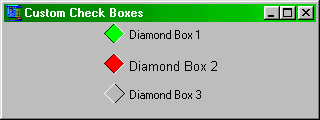
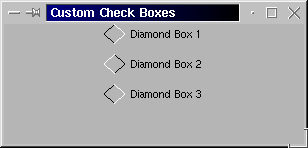
above example). 10.10 QDiamondBox Source Code Listing
$APPTYPE GUI
$TYPECHECK ON

TYPE QDiamondBox EXTENDS QCanvas     '' You can extend any QObject
  '-- New Properties, you can also add components
  Caption AS STRING
  Checked AS INTEGER
  HiLightColor AS INTEGER

  '-- There are no protected methods, but you should let the user know anyway.
  '-- PROTECTED (meaning you shouldn't directly call it in your program).
  SUB DrawComponent
    IF QDiamondBox.Checked THEN
      QDiamondBox.Line(QDiamondBox.Height/2,0,0,QDiamondBox.Height/2,0)
      QDiamondBox.Line(0,QDiamondBox.Height/2,QDiamondBox.Height/2,QDiamondBox.Height,0)
      QDiamondBox.Line(QDiamondBox.Height/2,0,QDiamondBox.Height,QDiamondBox.Height/2,0)
      QDiamondBox.Line(QDiamondBox.Height,QDiamondBox.Height/2,QDiamondBox.Height/2,QDiamondBox.Height,0)
      QDiamondBox.Paint(QDiamondBox.Height/2, QDiamondBox.Height/2, QDiamondBox.HiLightColor, 0)
      QDiamondBox.Line(QDiamondBox.Height/2,0,QDiamondBox.Height,QDiamondBox.Height/2,&HFFFFFF)
      QDiamondBox.Line(QDiamondBox.Height,QDiamondBox.Height/2,QDiamondBox.Height/2,QDiamondBox.Height,&HFFFFFF)
    ELSE
      QDiamondBox.Line(QDiamondBox.Height/2,0,0,QDiamondBox.Height/2,0)
      QDiamondBox.Line(0,QDiamondBox.Height/2,QDiamondBox.Height/2,QDiamondBox.Height,0)
      QDiamondBox.Line(QDiamondBox.Height/2,0,QDiamondBox.Height,QDiamondBox.Height/2,0)
      QDiamondBox.Line(QDiamondBox.Height,QDiamondBox.Height/2,QDiamondBox.Height/2,QDiamondBox.Height,0)
      QDiamondBox.Paint(QDiamondBox.Height/2, QDiamondBox.Height/2, &HBBBBBB, 0)
      QDiamondBox.Line(QDiamondBox.Height/2,0,0,QDiamondBox.Height/2,&HFFFFFF)
      QDiamondBox.Line(0,QDiamondBox.Height/2,QDiamondBox.Height/2,QDiamondBox.Height,&HFFFFFF)
    END IF
    QDiamondBox.TextOut(QDiamondBox.Height + 5, QDiamondBox.Height/2-QDiamondBox.Height/4, QDiamondBox.Caption, 0, -1)
  END SUB

  '-- Inherited Events (sorry, can't create any new events)
  '-- The user can still override these events, but it's not a good idea.
  EVENT OnClick
    IF QDiamondBox.Checked THEN
      QDiamondBox.Checked = 0
    ELSE
      QDiamondBox.Checked = 1
    END IF
    QDiamondBox.DrawComponent
  END EVENT

  EVENT OnPaint
    QDiamondBox.DrawComponent
  END EVENT

  '-- Default values
  CONSTRUCTOR
    Height = 30
    Width = 100
    HiLightColor = &H00FF00
    Caption = "DiamondBox"
    Checked = 0
  END CONSTRUCTOR
END TYPE


'----- Test our new component

DECLARE SUB DBox2Click

DIM Font AS QFont
    Font.Name = "Arial"
    Font.Size = 10

CREATE Form AS QForm
  Center
  Height = 120
  Caption = "Custom Check Boxes"
  CREATE DBox1 AS QDiamondBox
    Caption = "Diamond Box 1"
    Left = 100
    Height = 20
  END CREATE
  CREATE DBox2 AS QDiamondBox
    Caption = "Diamond Box 2"
    Top = 30
    Left = 100
    Height = 20
    Width = 140
    HiLightColor = &H0000FF
    Font = Font
    ShowHint = 1 ' True
    Hint = "Click me"
    OnClick = DBox2Click
  END CREATE
  CREATE DBox3 AS QDiamondBox
    Caption = "Diamond Box 3"
    Top = 60
    Left = 100
    Height = 20
  END CREATE
  ShowModal
END CREATE


SUB DBox2Click
  DBox2.InheritOnClick    '' Inherit event
  ShowMessage("Diamond Box 2 clicked")
END SUB
| Prev Chapter | Contents | Next Chapter |